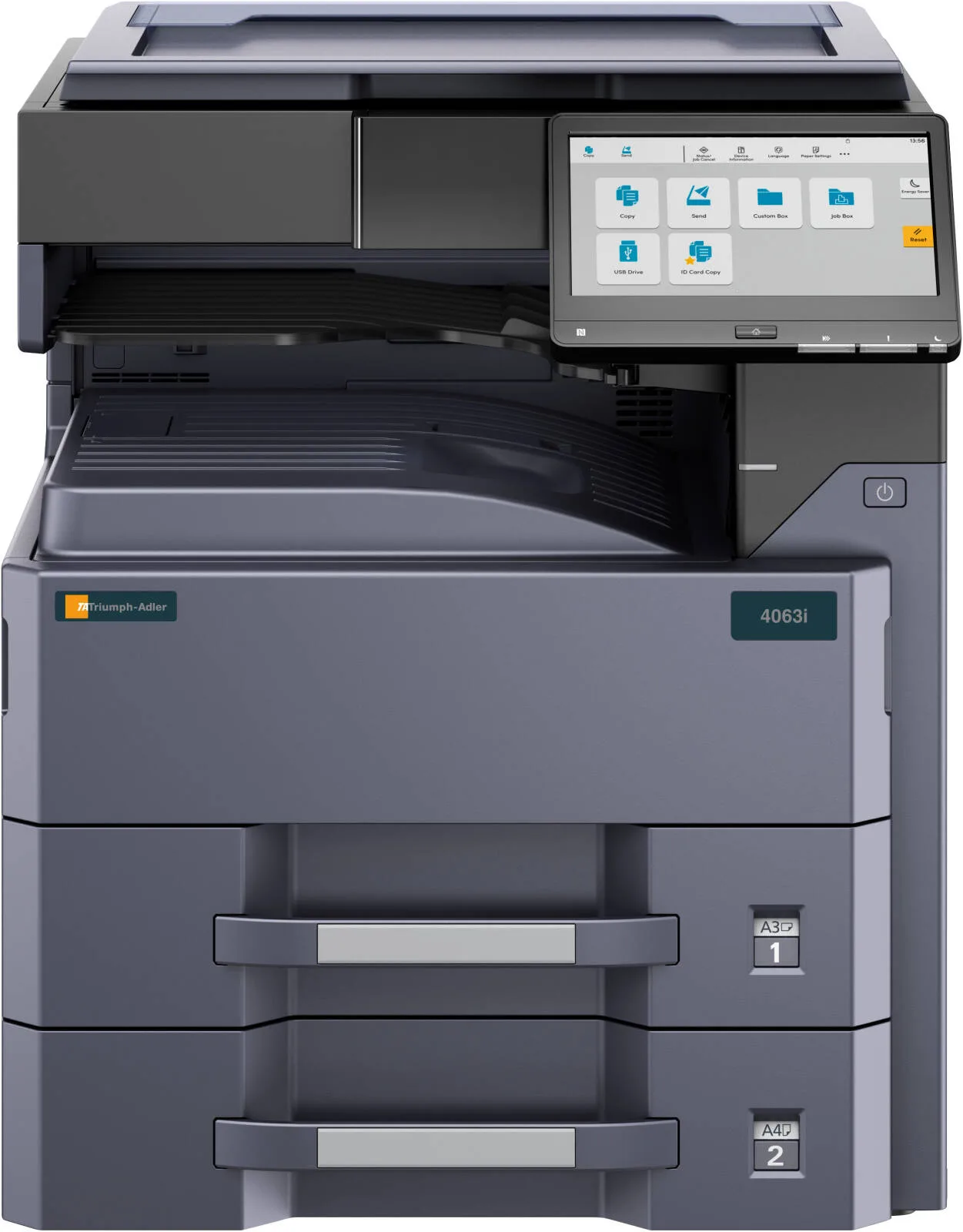
Triumph Adler 3263i Multi-Function Laser Printer, Fax, Scan, Print, Copy, 9" Color Touch Screen, 32 ppm Print Speed, 1200 x 1200 DPI Resolution, USB 3.0 Interface, Double Tray, Black
- 3263i
Warranty: 1 Year — effortless warranty claims with UK-wide coverage. Learn more
Key specifications
- Print speed
- 31-40 ppm
Details
- Shipping Weight
- 59 Kg
- Shipping Dimensions
- 59.40 cm x 69.60 cm x 68.30 cm
- Type
- Desktop
- Function
- Optional: Fax, Scan, Print, Copy
- Print Technology
- Laser B/W
- Original Format
- Max A3 from Platen Glass
- A4, Simplex, B/W
- 32 b/w-pages/min.
- A4, Duplex, B/W
- 17 b/w-pages/min.
- Printing, B/W
- 4.9 seconds
- Copying, B/W
- 4.3 seconds
- Warm-up Time
- 18 seconds
- Copy Resolution
- 600 x 600 dpi
- Greyscales
- 256
- Universal Cassettes Amount
- 2 x 500 sheet universal cassettes
- 1st Cassette Types
- A5R-A3
- 2nd Cassette Types
- A5R-A3
- Multi-Bypass Amount
- 100 sheet multi-bypass (A6R-A3)
- Multi-Bypass Types
- A6R-A3
- Paper Weights (Universal Cassette Min)
- 60 g/m²
- Paper Weights (Universal Cassette Max)
- 163 g/m²
- Paper Weights (Multi-Bypass Min)
- 45 g/m²
- Paper Weights (Multi-Bypass Max)
- 256 g/m²
- Paper Weights (Duplex Min)
- 60 g/m²
- Paper Weights (Duplex Max)
- 163 g/m²
- Job Separator
- 50 sheet A4 (standard)
- RAM
- 4 GB
- RAM Max
- 4 GB
- SSD
- 32 GB
- Continuous Copying
- 1 to 9999
- Zoom Range
- 25% to 400%
- Zoom Step
- 1%
- Adjustable Colour Touch Screen
- 10.1 inch
- Management Codes
- 1000
- Skip Blank Pages
- Yes
- Encryption/Overwriting of Hard Disk Data
- Yes (Data Security Kit and Trusted Platform Module)
- Secure Boot and Runtime Integrity Check
- Yes
- Trusted Platform Module (TPM)
- Yes
- Duplex
- Yes
- Dimensions (Height/Width/Depth)
- 683 mm / 594 mm / 696 mm
- Weight
- 59 kg
- Mains Voltage
- 220/240 V
- Utility Frequency
- 50/60 Hz
- Power Consumption (Max/Busy/Standby/Sleep)
- 1620 W / 510 W / 100 W / 0.5 W
- Power Consumption (TEC)
- 0.4 kWh/week
- Noise Level (Busy, B/W/Standby)
- 48 dB(A) / 31.4 dB(A)
- Safety
- CE, GS/TÜV
- Integrated within the System
- Yes
- Print Format
- A6R-A3
- Print Resolution (Min/Max)
- 600 x 600 dpi / 1200 x 1200 dpi
- 10/100/1000BaseTX
- Yes
- USB Host
- Yes
- USB 3.0
- Yes
- SD-Card Slot
- Yes
- Network Protocols
- TCP/IP, Net BEUI
- Operating Systems
- Windows 8.1, Windows 10, Server 2012 R2, Server 2016, Server 2019, Linux, Mac OS 10.9
- Emulations
- KPDL 3 (PostScript 3 compatible), XPS, PRESCRIBE Ile, PCL6 (PCL 5c, XL), PDF
- Functions
- USB Direct Printing, Apple AirPrint, NFC, Private Printing, Barcode Printing, SNMPv3, PDF Direct Printing, Wi-Fi, etc.
- Scan Type
- CCD Colour and B/W
- Scan Format
- Max A3
- Scan Resolution
- 300 dpi, 200 dpi, 400 dpi, 600 dpi
- Scan Mode
- Photo, Text, Photo/Text, Optimized for OCR
- File Types
- TIFF, JPEG, XPS, PDF/A, PDF/A-1a, PDF/A-1b, PDF/A-2a, PDF/A-2b, High Compression and Encrypted PDF, OpenXPS
- Compatibility
- Super G3
- Modem Speed
- 33.6 kbps
- Transmission Speed
- 3 seconds or less using JBIG
- Compression Method
- JBIG, MMR, MH, MR
- Fax Resolution
- Standard (200 x 100 dpi), Fine (200 x 200 dpi), Super Fine (200 x 400 dpi), Ultra Fine (400 x 400 dpi), 600 x 600 dpi
- Fax Memory
- 170 MB
- Abbreviated Dial
- 2000 Numbers
- One-Touch Dial
- 1000 Numbers
- Group Dial
- 500 Numbers
- Operating Systems (Fax)
- Windows 8.1, Windows 10, Server 2012 R2, Server 2016, Server 2019
- Functions (Fax)
- Delayed Transmission, Max 2 Fax Kits for Parallel Transmission and Reception, Automatic Redialling, Network Fax Driver
4.511 reviews
Got something to share?
Rate this product — your experience helps other buyers.
Rosie F. Used for: 3–6 months
Cons
The A3 tray sticks unless you push it home squarely
Comment
Quick, quiet by copier standards, and it has swallowed everything we have fed it
Isla D. Used for: 6–12 months
Pros
The bypass tray takes anything you dare put in it
Cons
Warm-up whirr when it has been sat idle
Comment
The bypass tray is the unsung part of this machine: envelopes, card, our thick report covers, all of it goes through without a settings change. For an office that prints odd things every week that has been worth more than the speed
Ivy R. Used for: 1–3 months
Cons
Thin letterheads come back from the duplex out of square
Comment
The duplex is the weak spot here. On ordinary 80gsm it is faultless, but our headed paper is thinner and roughly one sheet in twenty comes back through with the second side a few millimetres out of square. Enough that we now run letterheads single-sided and turn them by hand, which rather defeats the point of a machine this size. Everything else is what you would want. It is quick, the toner has barely moved in six weeks of steady use, and the panel is the least annoying I have used on a machine of this type. Four stars, and the fifth is sitting in that paper tray.
Florence W. Used for: Less than a month
Pros
Printing within the hour of the pallet turning up
Cons
Enormous — measure the doorway first
Comment
Arrived on a pallet, plugged in, printing before lunch. Huge, fast, no nonsense!
Leo K. Used for: 6–12 months
Comment
Does 35 pages a minute all day long and has never once left anybody standing at the tray waiting. Boring in the best possible way
Thomas B. Used for: More than a year
Comment
The machine we replaced was a colour MFP that nobody trusted, so the brief for this one was simple: mono, fast, and it must not stop. On that it has delivered. It sits in the corridor outside the accounts office, it has done a shade over 90,000 pages, and in that time the only intervention has been toner, one waste bottle, and a firmware update our engineer did while he was in for something else. Card goes through the bypass without a murmur. Labels do too, which surprised me, because the manual is coy about it and a sheet of address labels comes out flat and still stuck down. Two things stop it being five stars. It is slow to wake: leave it overnight and the first page takes the better part of half a minute, which feels absurd on a machine that then rattles off thirty-odd a minute. And the department login is a four-digit affair on a touchscreen that takes fingerprints beautifully. Neither is a reason to buy something else.
Millie E. Used for: 3–6 months
Pros
Scans a whole bundle to email in one pass, right way up
Cons
The manual reads like a translation of a translation
Comment
Bought on the say-so of our copier engineer rather than anything I read, and he was right. It scans a fifty-page bundle to email in one go and the file arrives the right way up, which the last machine managed about half the time. No regrets whatsoever!
Harry R. Used for: 3–6 months
Pros
Long runs without the pauses the old one made
Cons
Toner comes from one supplier and arrives when it arrives
Comment
Our print room does school worksheets in runs of two and three hundred, and this takes them without the pauses the old machine made every fifty sheets. Stapled sets come out square. The reason it loses a star is the consumables: our usual supplier does not stock the badge, so toner comes from one place and arrives when it arrives. Worth checking before you order if you are somewhere rural like us.
Alfie M. Used for: More than a year
Pros
Third toner in and still cheaper than the machine it replaced
Cons
It wakes up with a clunk
Comment
A year and a half of running a busy conveyancing department and it has jammed twice, both times because somebody fanned a ream badly. What sold us was the toner. We are on the third black and the counter says just under 60,000 pages, which is nowhere near what the old machine cost us. It takes card for our covers without complaint and the stapler has not misfired yet. It is not silent when it wakes up, there is a proper clunk from inside, but in a room with six people and a phone system nobody notices.
Harry K. Used for: 3–6 months
Pros
Scans come out at a sensible file size
Cons
Every Mac needed the full driver fetching by hand
Comment
The Macs in our studio were the question mark, and the answer is fine with an afternoon's work. The driver Apple offers on its own will print, but it cannot see the second tray or the stapler, so somebody has to go and fetch the proper package for each machine. Once that was done it became the least troublesome thing in the building. Scans arrive at a size you can actually email rather than the 40MB monsters the old one produced, and a hundred-page double-sided job takes about four minutes from pressing go. It is not a handsome machine and the panel could be brighter, but neither matters at half past four on a Friday.
Harry M. Used for: Less than a month
Pros
Kyocera engineering under a badge nobody recognises
Cons
The address settings hide two menus deep
Comment
Nobody in this office had heard of Triumph Adler, which is precisely why it cost less than the Japanese machine we nearly ordered. It turns out to be much the same box underneath with a different badge on the front. Delivery is a two-man job and it wants a proper spot, not the end of a desk. Setting up ran to about an hour. The network side is fine once you know where the panel hides things, though the wizard buries the address settings two menus deep, and I had it printing to the wrong tray all morning before I found the paper mapping. Since then it has asked for nothing.