The seller ran a benchmark while you watched. Five minutes, a good score, temperatures in the seventies, no artefacts. You took the card home, played for an hour, and the screen filled with coloured confetti before the driver reset itself.
The seller was not necessarily dishonest. A five-minute test measures the part of the card that reaches its final temperature quickly, and the part that fails an hour in is the part that does not.
Two components, two very different clocks
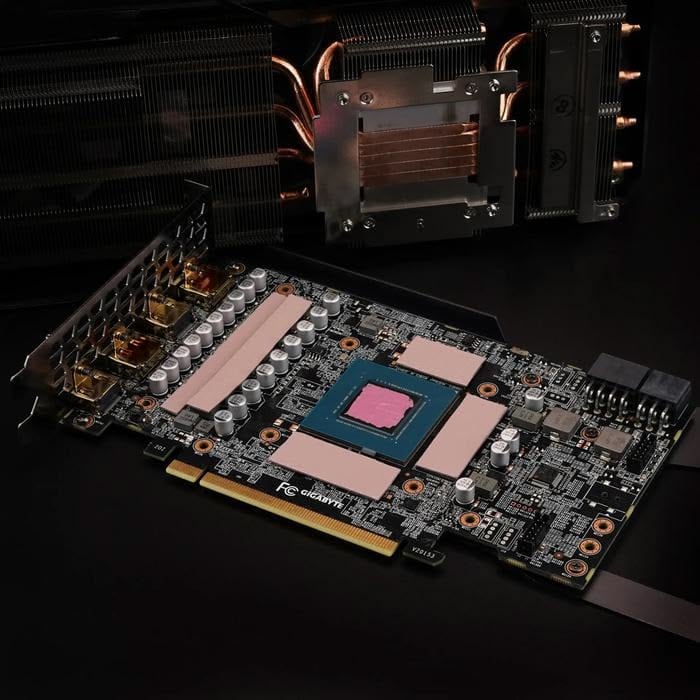
The processor at the centre of a graphics card sits directly under the cooler's base, with a thin layer of paste between them. Heat has a short, high-quality path out. Put it under load and it climbs to its steady temperature in a couple of minutes and stays there.
The memory chips are a different situation entirely. They surround the die, they contact the cooler through thermal pads rather than paste — a longer path through a softer material — and on many cards some of them are on the back of the board, cooled by a backplate or by nothing at all.
So the memory has a longer thermal time constant. It is still climbing at twenty minutes, sometimes at thirty. A five-minute run catches the core at its final temperature and the memory somewhere in the middle of its journey.
That is the entire mechanism, and everything below follows from it.
What too-hot memory does
Memory does not fail by stopping. It fails by getting things slightly wrong and being asked to try again.
The controller detects errors and retries, which costs bandwidth and shows up as performance quietly falling away. Beyond that the memory subsystem reduces its own speed to stay safe. Past that you get the visible failures: corrupted textures, coloured speckles, geometry stretching off the screen, and eventually the display driver timing out and resetting — which looks like a black screen and a notification, and is the machine saving itself.
The temperatures involved are higher than people expect. The fast memory used on high-end cards is specified to operate up to around 105 °C at the junction, with throttling behaviour beginning above roughly 95 and hard limits near 110. And junction temperature is not surface temperature — a junction reading of 105 can correspond to a surface you would measure at 70 to 75.
Why the fans never noticed
Here is the part that makes this specifically a used-card problem.
On most cards the fan curve is driven by the core temperature. The core is well cooled and reaches a comfortable seventy-something, so the fans settle at a moderate speed and stay there. The memory, on its longer path with older pads, keeps climbing — and nothing in the control loop is watching it.
You can genuinely have a core at 70 °C and memory at 98 °C and throttling, on a card whose fans are barely working and whose monitoring panel, if it only shows the core, looks entirely healthy.
Which is also why clock speeds can fall on a card that appears cool. The card is protecting a component the display is not showing you.
What ages on a used card
Three things, and they all attack the same path.
The pads dry out. Thermal pads are soft, filled polymers, and years of heat cycling drives out the oil that makes them conform. An old pad is harder, thinner and less conductive than a new one, and the memory's already-long path gets longer.
Dust fills the fin stack. This affects everything, but the memory has the least margin to lose.
Somebody may have been in there. A card that has been opened for a repaste may have been reassembled with pads of the wrong thickness — too thin and they do not contact, too thick and the cooler does not seat on the die. Both are worse than leaving it alone.
None of this is about mining specifically, and it is worth saying so: a card that spent two years at a steady moderate load may well be in better condition than one that spent two years being heated and cooled twenty times a day. Heat cycling ages the pads and the solder; sustained warmth is gentler than the internet believes.
What a benchmark score cannot show you
A score is a throughput measurement. It says the card completed a known amount of work in a certain time, and it is genuinely useful for one thing: confirming the card is roughly the model it claims to be and not underperforming grossly.
It is nearly blind to everything else that matters on a used card.
A card running at a reduced power limit will score within a few per cent of stock, because the last few per cent of power buys very little performance — so the setting that would hide a thermal problem is invisible in the number. A card with modified firmware likewise reports whatever the firmware says. And a card that is stable for the two or three minutes a benchmark runs tells you nothing about the twentieth minute, which is the entire subject of this article.
So treat the score as an identity check rather than a health check. The questions worth asking the seller are different ones: how long they have owned it, whether it has been opened, whether the pads or paste have been changed and by whom, and whether they are willing to leave a game running for an hour while you watch the temperatures.
If you have already bought it
A card that throttles or artefacts an hour in is usually repairable, and the repair is the one this article has been circling: new thermal pads on the memory, and fresh paste on the die while it is open.
It is a genuinely worthwhile job on an older card and it is not a beginner's job. The critical part is pad thickness, which is not a preference — it is a dimension. Too thin and the pad does not bridge the gap between chip and cooler, so the memory is worse off than before. Too thick and the cooler cannot seat properly on the die, so the core is worse off. The correct thickness varies by card and often by position on the same card, and it has to be looked up for that specific model rather than guessed.
Before opening anything, check the simpler causes: dust in the fin stack, a fan that has stopped, a case with no airflow, and the card sagging enough to tilt the cooler. All of those produce the same symptom and none of them requires a screwdriver anywhere near the die.
How to test a used card properly
- Run it for a full hour, not five minutes. The failure you are looking for lives past the twenty-minute mark, and no shorter test can find it.
- Watch the memory junction temperature, not just the core. Current monitoring tools report it on cards that expose it; if the card does not expose it, lengthen the test rather than trusting the core reading.
- Watch the clocks over the hour. A card that starts at its boost clock and settles lower is normal; one that steps down repeatedly and unevenly is throttling against something.
- Look for artefacts deliberately. A game with large textures and long draw distances will show memory trouble sooner than a synthetic loop.
- Check the fans through the whole range, including the noise they make at high speed. Bearings are the other thing that wears.
- Look at the card. Screws with damaged heads, warranty stickers broken, paste squeezed out at the edges — all tell you it has been opened, which is not disqualifying but is worth a question.
- Check the power limit and the firmware have not been altered. A card running at a reduced limit will pass a test it would fail at stock.
Two things we would not buy
A used card on the strength of a short demonstration, in person or on video. The test that matters takes an hour, and a seller unwilling to leave it running for one is telling you something without saying it.
And a card advertised with fresh paste and pads unless the work is documented. Correctly done it genuinely rejuvenates a card and is a point in its favour. Done with the wrong pad thickness it creates exactly the fault this article describes, and from the outside the two are indistinguishable.
How this was put together
The memory operating limits, the temperature at which bandwidth begins to be reduced, and the relationship between junction and surface temperature come from the memory manufacturer's own specifications and from the monitoring work that made those readings visible on consumer cards in the first place. The behaviour of fan curves driven by core temperature, and the resulting case of a cool core alongside hot memory, is documented by the people who investigated it when the readings became available. The soak-testing approach — running long enough for the slow components to arrive at their steady state — is standard practice among the outlets that publish thermal results rather than peak numbers.
The framing is ours: a five-minute test is not a short version of an hour-long test. It is a test of a different component, because the core has finished its climb and the memory has not — which is why a card can pass one honestly and fail the other.