You played a part in, heard it perfectly while your hands were on the keys, exported the project and got a file with nothing in it. Or you sent the part to somebody else and it came back sounding like a different instrument entirely. Both of those are the same fact arriving twice: the cable between your keyboard and your computer carries instructions, not audio, and instructions are silent until something obeys them.
What is actually on the wire
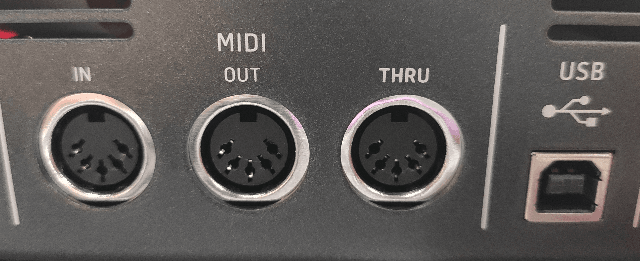
A five-pin MIDI connection is a current loop running at 31 250 baud. Each byte is framed with a start bit and a stop bit, so ten bits go down the wire per byte, and one byte therefore occupies 320 microseconds exactly.
Pressing a key produces a note-on message of three bytes: which channel and what kind of message, which of the 128 note numbers, and how hard it was struck on a scale of 1 to 127. Three bytes at 320 microseconds each is 960 microseconds — call it a millisecond to say "middle C, fairly hard, on channel one". Releasing the key sends a second message of the same size.
Nothing in that description contains a waveform, a timbre, or a volume in any acoustic sense. Velocity is not loudness; it is a number that the receiving instrument is free to interpret as loudness, or as brightness, or as which of eight sampled layers to play. This is the entire reason a MIDI part travels so well and sounds so different on arrival.
The serial line has a ceiling, and chords sit under it
Because the messages queue on one wire, simultaneity is an approximation. A single MIDI port carries roughly 1 040 note-on messages per second, which means notes that you played together leave the port about a millisecond apart, in the order the keyboard scanned them.
Play a ten-note chord and the last note starts its journey around 10 milliseconds after the first. The specification's own optimisation helps: when consecutive messages share the same status byte, the repeats may be omitted, so ten notes travel as 21 bytes instead of 30 — a saving of about a third, bringing the spread closer to 6.7 milliseconds.
Whether that matters depends on what you can hear. Two attacks begin to separate perceptually somewhere around 20 to 30 milliseconds, so a ten-note chord over a single DIN port sits inside the threshold, but a dense sustain-pedal passage with a controller stream running alongside it does not necessarily. This is the honest version of "MIDI is slow": it is not slow for a melody, and it has a real ceiling for a keyboard player who voices thick chords while moving a modulation wheel.
Where the milliseconds actually accumulate
The transport turns out to be the smallest term. In a published benchmarking study of MIDI hardware, interface latencies were measured with sub-millisecond resolution across a range of devices. Internal PCI interfaces averaged between 0.958 and 0.964 ms. USB interfaces averaged 0.964 to 1.223 ms, with individual measurements ranging from 0 to 4 ms.
The same study measured the devices at the other end, and the spread there is an order of magnitude wider. Depending on the sound selected, one small synthesiser module answered between 1.79 and 16.75 ms after the message arrived; another module ranged from 2.54 to 19.31 ms; a third from 3.04 to 11.23 ms. The instrument's own patch — how many layers it loads, whether the attack is sampled or synthesised — moved the timing by more than fifteen milliseconds without a single change to the cable.
Add the pieces in the order they happen, for one note played on a keyboard into a software instrument: about 1 ms to get the message across USB, whatever the instrument takes to respond, and the audio buffer's round trip on the way out — 5.33 ms for a 256-sample buffer at 48 kHz on the output leg alone. The transport is a rounding error next to the instrument and the buffer. If your part feels late, the cable is the last thing to suspect.
Why the export was silent
Now the original symptom. A MIDI track holds note numbers and velocities. When you play, your software passes them to a virtual instrument, which produces audio in real time; you hear the instrument, not the track. When you export audio, the software renders that instrument's output — unless the instrument was bypassed, disabled, frozen without its audio, or routed somewhere the export did not follow. Then it renders the track's own contribution, which is silence, faithfully.
The same logic explains the file that came back wrong. A standard MIDI file can carry a program-change message asking for instrument number 33, and the General MIDI convention says number 33 is an acoustic bass. What it cannot carry is the sound itself, so your bass and their bass agree on the name and nothing else. Send a colleague the audio and they hear what you heard. Send them the MIDI and they hear their own instrument playing your notes — which is sometimes exactly what you want, and never what you get by accident.
What to do about it
- Before exporting, confirm that the instrument on the track is enabled and its output is routed to the master. A muted or bypassed instrument is the single most common cause of a silent render.
- Render or bounce the track to audio when you are done writing it. This is also the step that removes the instrument's own response time from the timing you hear.
- Send audio when you want somebody to hear your part, and MIDI when you want them to play it with their own sounds. Sending both costs nothing and answers the question before it is asked.
- If a chord feels smeared on hardware, split the parts across two ports rather than two channels. Channels share the wire; ports do not.
- If a hardware module feels late, change the patch and measure again before blaming the interface. The study above found a fifteen-millisecond spread inside single devices, depending only on the sound chosen.
The purchase this does not justify
No cable makes 31 250 baud faster. A premium MIDI lead, a gold-plated DIN plug, a shorter run — none of them change the framing of a byte, and none of them touch the two terms that actually dominate the delay. If your MIDI timing is a problem, the money belongs on a second port, an interface with a properly written driver, or a machine that can hold a smaller audio buffer. It does not belong on the cable, and anyone selling you a fast one is selling you a number that the standard fixed decades ago.
The check that takes a minute
Disable the instrument on a MIDI track and play the part again. The notes still appear in the editor, the meters stay dead, and nothing comes out of the speakers. That is not a fault — that is the demonstration. The track is a list of instructions, and you have just removed the only thing in the chain that was making them audible.
How this was put together
Five independent sources sit under the figures above: the MIDI specification's own serial parameters, giving 31 250 baud, ten bits per byte and 320 microseconds per byte; the specification's running-status optimisation, which reduces a ten-note chord from 30 bytes to 21; the throughput figure of roughly 1 040 note-on messages per second per port and the resulting ten-millisecond spread across a chord, as published by the standard's own body; a peer-reviewed benchmarking study of MIDI interfaces and sound modules, reporting mean interface latencies of 0.958 to 1.223 ms and module latencies from 1.79 to 19.31 ms; and the perceptual threshold of roughly 20 to 30 ms at which two attacks begin to sound separate.
The derived figures are ours: the 960 microseconds a three-byte note-on occupies, the 6.7-millisecond chord spread once running status is applied, and the assembled chain that puts the transport an order of magnitude below the instrument and the audio buffer.